Big Walk Landmarks & Getting Unlost
Visible anchors, meeting points, and flare discipline —turn getting lost into a story instead of a session killer.
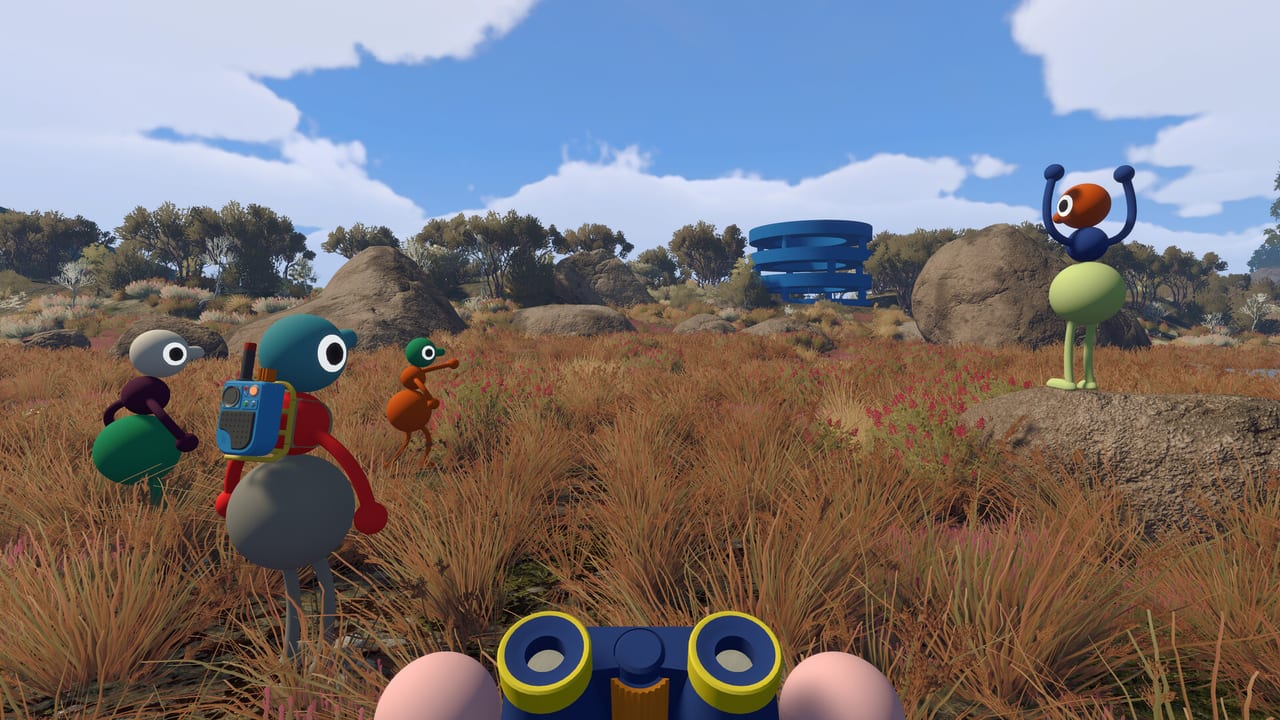
Every Big Walk group remembers the first time someone vanished into fog, caves, or a forest loop while proximity voice faded to nothing. House House built the island so landmarks remain readable from distance —bright structures on natural terrain, towers on coastlines, monuments on summits —but reading those landmarks is a team skill, not a solo HUD perk. This guide catalogs landmark types, meeting-point habits, and flare-based recovery that keep crossplay parties moving without abandoning the no-minimap design praised in reviews.
Start with Map Hub for map room workflow; return here when “where are you?” becomes the most-used phrase in voice chat.
What counts as a landmark
Good landmarks share traits:
Silhouette: Unique shape visible against sky —twisted trees, giant playground-color structures, sundial hubs, golden summit monuments mentioned in walkthrough coverage.
Elevation: Towers, cliffs, and watchtables let spotters see half the island; GameSpot highlighted ski lifts and trains as later mobile landmarks once unlocked on the host save.
Color contrast: Neon or primary-colored puzzle architecture against green/brown terrain pops in binoculars.
Audio: Radio stations with distinct songs, cowbells shaken rhythmically, megaphones echoing across valleys —sound landmarks when sight fails.
Light: Flashlights pointed upward at night create columns teammates spot from far away; lanterns mark camp during rain or cave exits.
Bad landmarks are generic —“that hill” or “the forest” —without agreeing which hill in a ridge chain. Name them precisely when planning in the map room.
Establish meeting points before you scatter
Before any split, pick two anchors: a primary rendezvous (map room, coastal tower, large bridge) and a secondary backup visible from the first (distant monument, flare-friendly clearing). Polygon noted that even separated players can reconvene at visible structures through trees if those structures were agreed upfront.
Roles reduce chaos:
Navigator: Holds map knowledge, calls landmark chain.
Spotter: Binoculars on high ground, translates view to Gestures & Arms point.
Flare bearer: Saves signal flares for real regroups —not comedy unless comedy helps morale.
Radio holder: Walkie-talkie for when proximity voice dies but flares are overkill.
Rotate roles across sessions so skill spreads through the Multiplayer Hub regulars.
Getting unlost: step-by-step recovery
When one player is missing and voice fails, run this ladder without skipping steps:
1. Missing player stops moving. Wandering while lost makes flares and voice search harder. Sit if safe to become a smaller target for spotters.
2. Main group gains elevation. Climb a tower, cliff, or structure; equip binoculars. Scan for movement or flashlight beams.
3. Call on walkie-talkie if radios were distributed during Map Hub planning. Keep messages short: landmark name, direction, height.
4. Arm signals from high ground —sustained left or right point toward the lost player’s last known path. Use megaphone if voice carries farther than raw shout.
5. Flare schedule —see next section.
6. Open paper map cooperatively at base camp if steps one through five fail; trace backwards along unlocked shortcuts the host save actually has open.
Panic-sprinting the whole island spreads the problem. Discipline beats speed.
Flare signals and tools/flares
Signal flares are the island’s universal “meet here” beacon —bright, visible across regions, referenced in Steam feature lists alongside walkie-talkies and laser pointers. Treat flares as navigation tools first, photo ops second.
Single flare: “I am here” or “Look this direction once.” Useful when the lost player still has line of sight to sky.
Timed flare schedule (recommended): Main group on high ground launches one flare every thirty seconds toward a agreed vector. Lost player watches the sky, notes repetition interval, walks toward the source. Consistent timing communicates direction better than random pops.
Lost player flare: If the missing member still carries a flare gun, one shot straight up says “find me” while the group scans from towers.
Laser pointer combo: Spotter marks a cliff face or tree line while flares define the camp —combines horizontal and vertical cues.
Flashlight columns at night: Entire group in a clearing, lights up —visible farther than character models alone.
Link future deep dives under Tools for flare pickup locations (weather stations, supply lockers in preview notes). Until then, prioritize finding flares during your first coastal and highland loops.
Landmark chains instead of compass directions
Compass north is fine for nav nerds, but Big Walk groups communicate better with chains:
“Spawn map —coastal tower —yellow arch —cave mouth.”
Each link must be visible from the previous or reachable via a known shortcut. When the host unlocks underground tunnels or ski lifts, update the chain aloud —guests on Join Codes only see shortcuts the host’s save opened.
Reviews describe unlocking trains and lifts as major navigation upgrades; missed rides become FOMO stories unless someone marks the next car with a laser.
Biome-specific unlost tips
Fog forests: Paths loop; spotter on watchtower is mandatory. Ground team follows laser dots, not gut feeling.
Caves: Voice echoes —use radio static awareness or deliberate silence plus gestures. Leave breadcrumb lights if lanterns allow.
Mountains: Long sight lines help until clouds roll; megaphones bridge valleys when proximity chat dies.
Coast: Sound of waves orientates roughly, but use towers instead of guessing shoreline curves.
Underground: Re-enter only with agreed flare timing outside; losing someone in dual-layer space doubles confusion.
Crossplay landmark etiquette
Steam, PS5, and Switch 2 players see the same world geometry once connected via Crossplay Platforms. Name landmarks descriptively for Switch friends on thinner voice —repeat the name twice before splitting.
Avoid platform-specific jargon during recovery (“Press Square”). Say “left point at the red arch.”
If a Switch player lacks voice, assign them flare or cowbell duty so their contribution stays audio-visual.
Preventing repeat losses
After a successful regroup, debrief briefly:
- Which landmark name confused people?
- Did flares run out because someone spammed them early?
- Was the navigator ahead without spotter backup?
- Did backpack map access fail because nobody offered to open packs?
Adjust the next route in the map room. Big Walk rewards groups that learn navigation together across host sessions —progress persists on the host per Host Saves, but navigation skill persists in your Discord memories.
When landmarks are not enough
Rare edge cases —host disconnect ends session for everyone; patch bugs; twelve-player chaos drowning voice —fall back to meta coordination: pause exploration, gather at map room, reissue Join Code from host, rerun tutorial gestures if new players joined mid-campaign.
Getting unlost is part of the adventure design; staying unlost is the skill this page teaches.
Related pages
Planning: Map Hub. Inputs: Gestures & Arms, Controls Hub. Online setup: Join Codes Hub, Online Requirements. Tools detail: /tools/ guides when live on the wiki.
Frequently Asked Questions
Quick answers to the most common Big Walk questions.
What is the best landmark for a meeting point?
Pick structures visible from far away —coastal towers, large colorful monuments, map room vicinity —and agree on them before splitting up.
How do flare schedules work for regroups?
Elevated group fires one flare every thirty seconds toward a direction; lost player watches the sky and walks toward the repeating signal.
Should I keep moving when lost?
Usually stop unless you know the route back. Moving increases search area and makes flares harder to interpret.
Where do I find signal flares?
Supply areas such as weather stations and progression unlocks on the host save —prioritize early pickup during coastal and highland exploration.
Do landmarks differ between platforms?
No. Crossplay sessions share one host world with the same geography; only voice and input tools differ by platform.